QRFront for hotels — in-room QR guest portal & front desk
City hotels, business hotels, and boutique properties: room QR for Wi-Fi, requests, and multilingual chat with a live front-desk board — no guest app or PMS project.
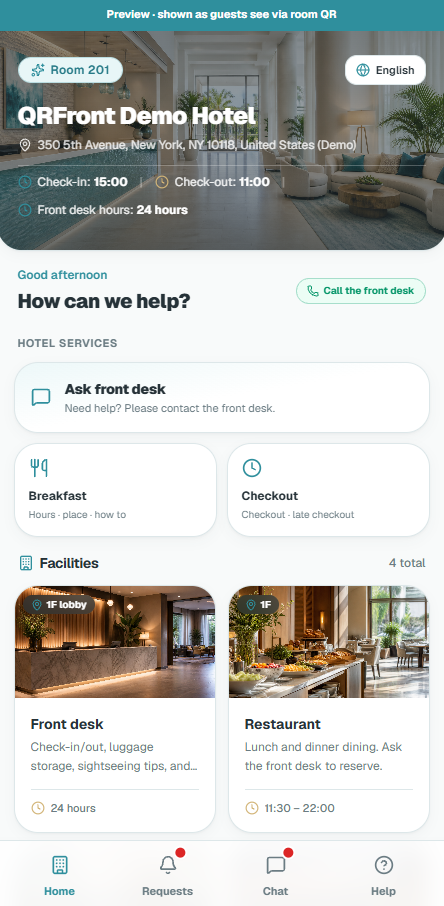
Actual Screen Displayed When Scanning In-Room QR
No app download · No account login · 1-tap Wi-Fi copy · Direct requests & facility guide
Seamless Real-Time Sync Between Guests & Front Desk
When guests submit requests or message in their native language, front desk receives audio alerts within 2 seconds with automatic 38-language AI translation.
QRFront for hotels
City hotels, business properties, and boutique hotels share the same guest friction: Wi-Fi questions, amenity calls, and language barriers at a busy front desk. QRFront puts a web portal behind every room QR so guests self-serve in the browser while staff run a live board.
Typical hotel workflow
- Front office registers floors and rooms, prints QR cards.
- Guests scan for Wi-Fi copy, requests, facility info, and chat.
- Desk triages on a three-column live board.
- Front desk runs from the hotel admin account on allowed devices.
No guest App Store install. No replacement of your PMS.
Where hotels see ROI first
- Fewer repetitive phone calls for Wi-Fi and towels.
- Faster acknowledgment when foreign guests use translated chat.
- Housekeeping visibility without radio-only workflows.
Pricing fit
QRFront Service is annual prepaid by room-count band (up to 1,000 rooms). AI translation uses separate credit packages when multilingual chat volume is high — use the pricing calculator with your foreign-guest percentage.
Related modules
- Guest QR portal — where scans start.
- Front desk board — where requests land.
- AI translation — optional token-billed cross-language chat.
Start here
- Live demo — no login.
- Help: Room QR setup guide.
- Blog: How to set up hotel room QR codes.