Hotel Guest Portal & Front Desk Operations
App-free in-room mobile portal, real-time front desk request board across PC & mobile, and 38-language AI translation chat in one unified system.
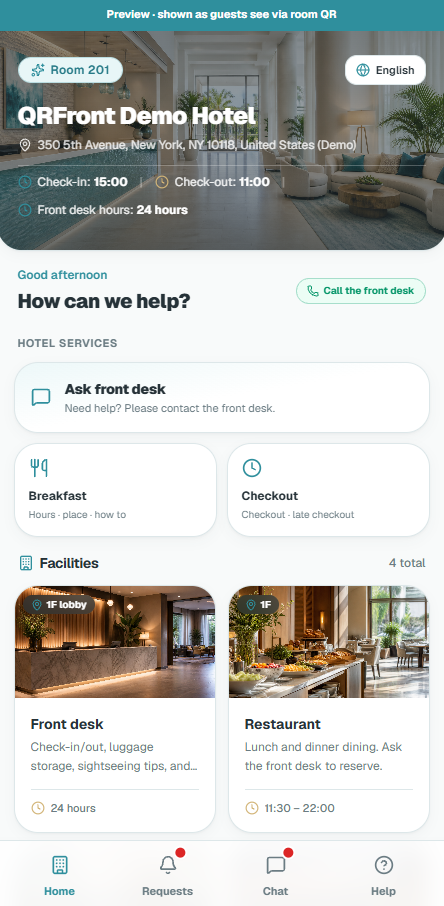
Actual Screen Displayed When Scanning In-Room QR
No app download · No account login · 1-tap Wi-Fi copy · Direct requests & facility guide
Seamless Real-Time Sync Between Guests & Front Desk
When guests submit requests or message in their native language, front desk receives audio alerts within 2 seconds with automatic 38-language AI translation.
Core Features & Benefits
Instant go-live without PMS integrationInstant In-Room Mobile Guest Portal
Guests simply scan room QR with native camera to launch in-room web portal. Includes 1-tap Wi-Fi copy, amenity requests, and hotel facility information.
Front Desk 3-Column Live Request Board
Inbound requests trigger instant audio alerts. The structured 3-column kanban board (New ➡️ In Progress ➡️ Done) prevents dropped requests and shift-handover confusion.
Real-Time Bidirectional AI Translation
Foreign guests chat in their native language while staff replies in theirs. AI automatically translates bidirectional chats in real time with transparent credits.
Zero-PMS Setup & Automatic Session Rollover
Runs independently without costly PMS integration. Sessions automatically roll over at checkout time (e.g. 11:00 AM) to protect guest conversation privacy completely.
Explore flagship A6, Square 100, and business card formats with 1-click batch PDF generation from front-desk admin.
Simple 3-Step Operations Workflow
Zero staff training requiredGuests scan the bedside acrylic stand QR code with their smartphone camera (no app install or signup required).
Guests request extra towels, water, or message the front desk in their native language with automatic 38-language AI translation.
Front desk receives audio alerts on the live kanban board within 2 seconds, dispatches staff, and marks completed in 1 click.
Detailed Technical Specifications & Operating Policies
Hotel Guest Portal & Front Desk Live Operations Solution
QRFront brings together an app-free in-room mobile guest portal, a real-time front desk request board, multi-device staff operations, and 38-language bidirectional AI translation chat into one unified, smart hoteliering system.
Eliminate expensive in-room phones and complex PMS interface projects, digitizing guest communications and front-desk workflows immediately.
---
1. Hotel Guest QR Portal (Mobile Web)
When guests scan the in-room QR card with their native smartphone camera, a mobile web portal opens instantly. There is zero App Store friction, no account creation, and no login required.
- 1-Tap Wi-Fi Copy: SSID and password copy directly to the clipboard with a single tap, eliminating typing from cards.
- Structured Amenity Requests: Guests order towels, bottled water, room cleaning, toiletries, and maintenance through forms automatically linked to their room number.
- Hotel Information & Facilities: Browse breakfast hours, floor facilities, checkout guidelines, and local attractions configured from the admin console.
- Real-Time Front Desk Chat: Replace outdated room phones with direct, in-browser messaging; front desk staff respond from the live board.
| Feature | Dedicated Guest Apps | QRFront In-Room QR Portal |
|---|---|---|
| Accessibility | App Store search, download, storage burden | Instant camera scan opens browser in 1 second |
| Authentication | Sign-up or booking number verification | Room QR automatically binds room session |
| Compatibility | Separate iOS / Android builds and updates | 100% consistent across all smartphones and browsers |
| Cost | High development & ongoing maintenance fees | Card print + transparent room-count annual subscription |
---
2. Front Desk Live Request Board
When a guest requests amenities or sends a message, it appears immediately on the front desk live board accompanied by audio alerts.
- Real-Time 3-Column Kanban Workflow:
1. New: Freshly arrived requests requiring attention. 2. In Progress: Assigned to housekeeping, maintenance, or room service. 3. Completed: Resolved and archived for full audit logs and reporting.
- Unified Room Context: View room number, guest language, recent request history, and live chat threads in one clean interface.
- Zero Paper Logs or Missed Calls: Prevent missed guest orders, delivery mix-ups, and handover communication breakdowns across shifts.
---
3. Multi-Device Admin Access: PC, Phone & Apps
Your hotel team operates with one unified hotel admin account across desktop PCs, tablets, smartphones, and desktop applications.
- Operate Everywhere: Use large-screen desktop displays at the front desk, while housekeeping and duty managers check live requests on smartphones while walking room floors.
- Concurrent Device Management: Manage active devices under Connection Management (
/admin/staff-access), assign custom device names, and remotely revoke lost or unused devices. - Background OS Alerts: Native desktop apps for Windows and macOS ensure incoming guest requests trigger desktop notifications even when minimized.
---
4. 38 UI Languages & Real-Time AI Translation Chat
Welcome international guests without language friction or bilingual staffing overhead.
- 38 Global UI Locales: Both guest portal and admin interfaces support 38 languages, allowing guests to navigate amenities and notices in their native tongue.
- Bidirectional AI Translation: Foreign guests write in their language, and staff respond in theirs. The AI translation engine converts cross-language messages in real time.
- Transparent Billing: Domestic/same-language chat consumes 0 credits. AI credits are only deducted on successful cross-language translations. New hotels receive complimentary credits upon signup.
---
5. Standalone Operation without PMS Work & Auto Session Lifecycle
QRFront operates independently without multi-month PMS interface projects or engineering overhead.
- Checkout-Time Auto Session Rollover: At your configured checkout time (e.g. 11:00 AM), the server automatically switches room sessions.
- Automatic Privacy Protection: Stayovers retain their ongoing thread, while a new guest’s scan instantly separates and retires prior chat history.
- Strict Role Separation: Guests stay strictly within their room QR session, completely segregated from hotel admin controls.